Keep PPO fees on the ledger and send your office fee on claims in Dentrix
How to set up a Dentrix insurance plan so the patient ledger shows the PPO fee while claims go out with your full office fee, without editing fees on every claim, and how to post the write-off on the EOB afterward.
Two fees for one procedure
An in-network PPO patient has two fees for every procedure. One is the PPO's contracted fee, which is what the patient's ledger and treatment estimates should show. The other is your office fee, also known as your UCR (Usual, Customary, and Reasonable) fee, for that procedure.
When you send a claim to the PPO, you can choose which fee to put on the claim. If you put the PPO fee on the claim, the payer sees what they expect and pays their contracted allowance. If you put your office fee on the claim, the payer still pays their contracted allowance, but they also see what you actually charge.
A lot of offices want the claim to carry the office fee while the ledger carries the PPO fee. Dentrix can help you manage this, one insurance plan at a time.
Why send your office fee to a PPO?
There are several reasons to put your UCR fee on the claim you send to the insurer:
- Potentially higher reimbursement. The contracted fee you have in Dentrix may actually be too low. This can happen if the PPO increased their fee schedule to you, or if your team accidentally entered the wrong values into the fee schedule. If you enter what you believe your contracted fee is on a claim, the payer will only pay what you ask for in this case, not the higher amount.
- Your contract may require it. Some PPO agreements say to bill your usual and customary fee. Check yours.
- A clear write-off. When the claim carries your office fee, the EOB shows the full difference as a contractual adjustment, usually
CO-45. You can see exactly what each plan's contract costs you. Our guide to dental claim adjustment codes explainsCO-45and the other codes you'll see.
How Dentrix picks each fee
The two fees are set in two different places on the insurance plan:
| Fee | Where it's set | What it controls |
|---|---|---|
| Ledger fee PPO contracted fee |
The Fee Schedule field on the Dental Insurance Plan Information window. | The fee that procedures post at for patients on that plan, so the ledger and estimates show the PPO fee. |
| Claim fee Your office fee |
Claim Setup > Provider and Fee Options > Fee Schedule. | Which fee prints on the plan's claims. |
The Claim Setup fee schedule has three choices:
- Default: the claim shows the fee the procedure was posted at, the same fee as the ledger.
- Billing Provider: the claim shows the fee from the billing provider's fee schedule. If that schedule holds your office fees, this is the setting you want.
- Insurance: the claim shows the fee from the plan's own fee schedule.
Setting up a plan, step by step
Before you start, make sure the PPO fee schedule exists in Fee Schedule Maintenance and is attached to the plan, and that your billing provider has your office fee schedule.
-
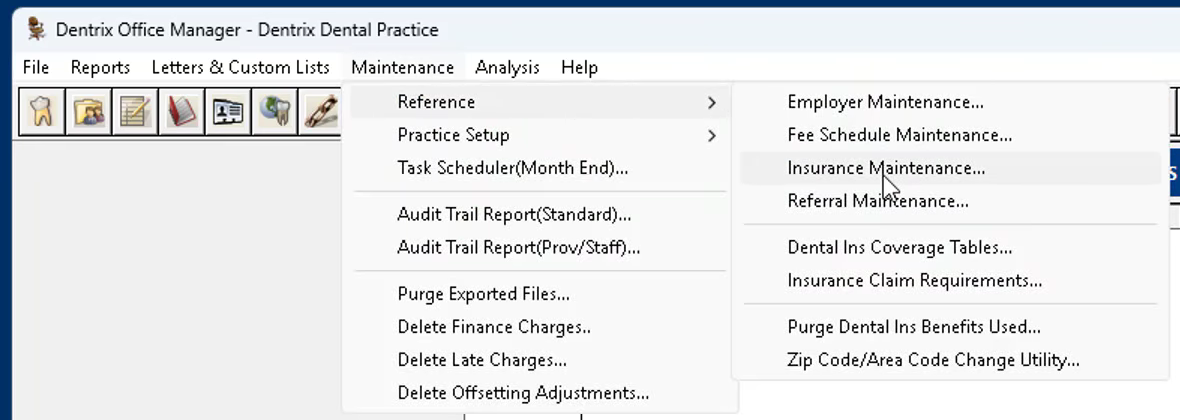
Open Insurance Maintenance
In the Office Manager, choose Maintenance > Reference > Insurance Maintenance.
-
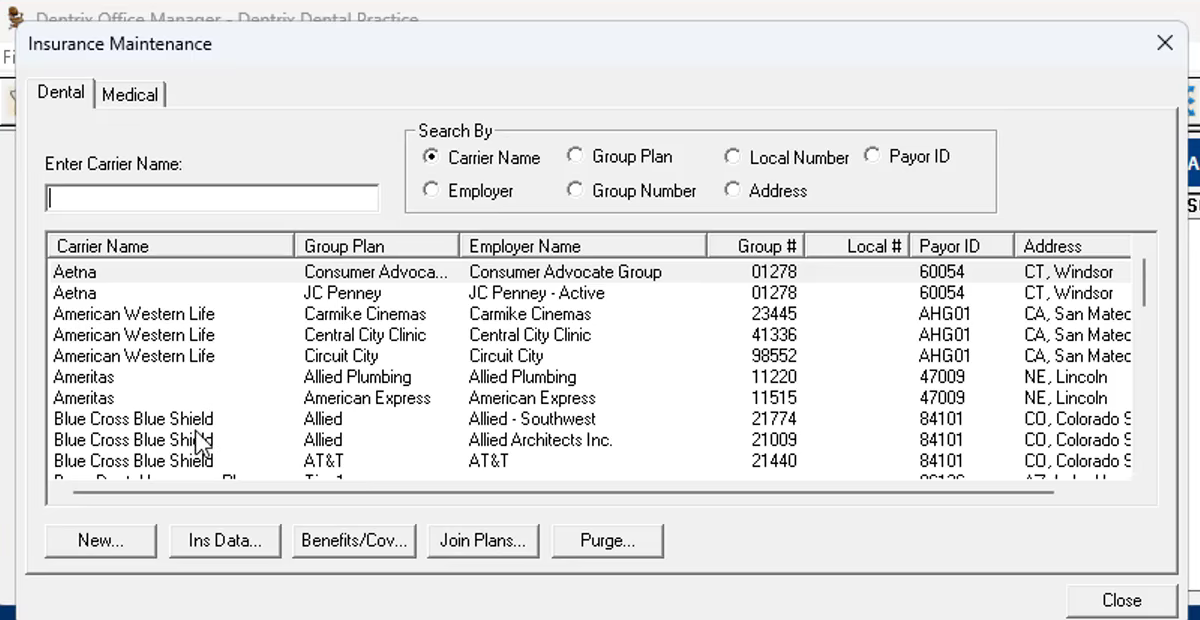
Find the plan
Search by carrier name (or group plan, employer, group number, or payor ID), then double-click the plan to open it. A carrier often has several plans, so check the group plan and group number before you change one.
-
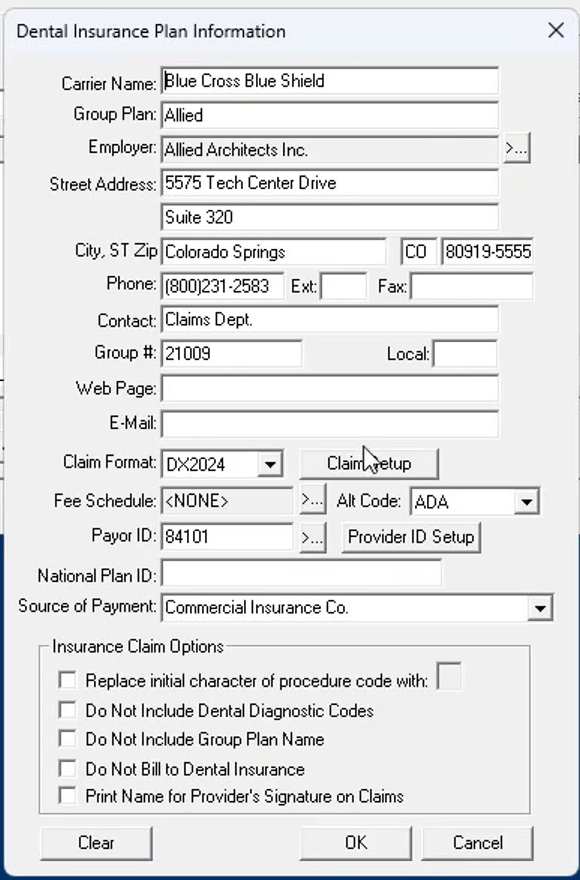
Open Claim Setup
On the Dental Insurance Plan Information window, confirm the Fee Schedule field holds the PPO fee schedule. Then click Claim Setup, next to Claim Format.
-
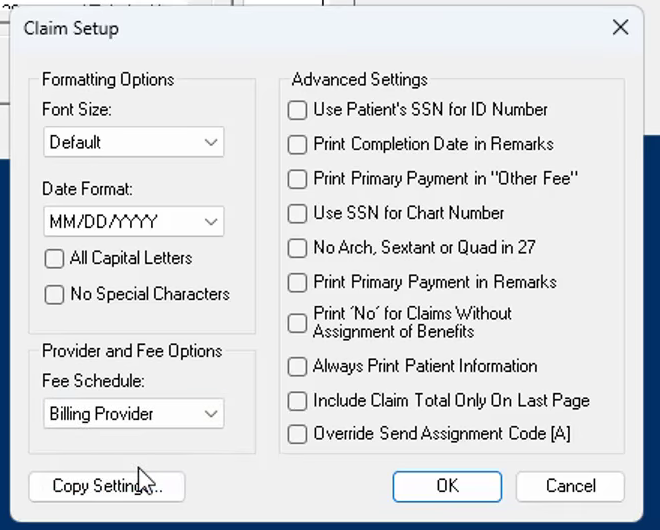
Set the claim fee schedule to Billing Provider
Under Provider and Fee Options, change Fee Schedule from Default to Billing Provider, then click OK.
-
Save the plan for everyone on it
Click OK on the plan window. When Dentrix asks, choose Change Plan for All so every patient on the plan gets the setting. Add As New Plan creates a separate copy of the plan instead, which is rarely what you want here.
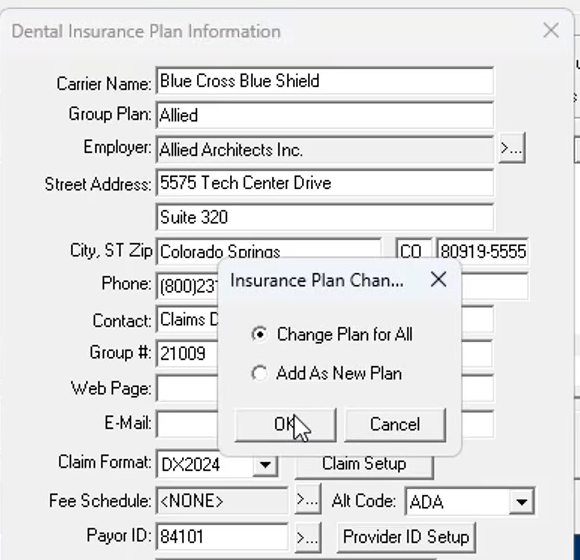
Repeat this for each PPO plan. Before you send a batch, print or preview one claim for a patient on the plan and check that it shows your office fee while their ledger still shows the PPO fee.
The older way: an "F" claim format
Before Claim Setup had a fee schedule option, offices did this with the claim format. You added a claim format in the practice definitions whose name ends in the letter F, then picked that format on the insurance plan. Claims printed with an F format carry the full office fee.
It still works, and plenty of offices still use it. If your plans already use an F format, there's no need to switch.
Posting the payment afterward
With this setup, the claim and the ledger don't agree on the fee, and that changes how you post the EOB.
Don't take the write-off twice. The EOB will show a CO-45 adjustment for the gap between your office fee and the allowance. That gap never reached the ledger, because the procedure posted at the PPO fee. If you also enter it as a write-off adjustment, the patient ends up with a credit.
Post the insurance payment and any patient portion as usual, and check the patient's balance on the first few claims for each plan to make sure it matches the patient responsibility on the EOB. If the allowance on the EOB is different from the PPO fee on your ledger, the fee schedule may be out of date. Our guide to dental insurance payment posting covers checking allowances and recording adjustments.
Common questions
How do I bill my office fee to insurance but keep the PPO fee on the ledger in Dentrix?
Attach the PPO fee schedule to the insurance plan so procedures post at the contracted fee, then open the plan's Claim Setup and set Provider and Fee Options > Fee Schedule to Billing Provider. Claims for that plan then print the billing provider's fee schedule (your office fee) instead of the fee on the ledger.
What is the "F" claim format in Dentrix?
It's the older way to do the same thing: a claim format added in the practice definitions with an F at the end of its name, which sends the full office fee on the claim. It still works and many offices still use it. Newer versions of Dentrix put the choice in the plan's Claim Setup instead.
Why bill insurance my full fee if the PPO only pays its contracted fee?
Payers build their fee data from what offices submit, so sending your contracted fee can hold down future allowances and fee increases. Some PPO agreements also require you to bill your usual fee. The payer still pays its allowance, and the difference shows on the EOB as a contractual adjustment (usually CO-45).
Do I post the CO-45 write-off if the ledger already shows the PPO fee?
Usually not. The write-off already happened when the procedure posted at the PPO fee, so entering the EOB's CO-45 amount as another adjustment takes it off twice and leaves the patient with a credit. Check the patient's balance after posting the first few claims to confirm.
Keep your dental claims moving, from upload to posting.
Upload your EOBs, 835s, and other documents. RevCanvas extracts the details, assigns claims to the right team member and location, and matches payments to bank transactions so your team knows when to post. Track progress with claim statuses and @-comments, with role-based access that lets managers follow the work.